前言
在爬取网站数据的时候,一些网站会对用户的访问频率进行限制,如果爬取过快会被封ip,而使用代理可防止被封禁。本项目使用scrapy框架对西刺网站进行爬取,并验证爬取代理的有效性,最终将有效的代理输出并存储到json文件中。
Github地址: https://github.com/RunningGump/crawl_xiciproxy
依赖
- python3.6
- Scrapy 1.5.0
创建项目
首先,我们需要创建一个Scrapy项目,在shell中使用scrapy startproject命令:
$ scrapy startproject xiciproxy
New Scrapy project 'xiciproxy', using template directory '/usr/local/lib/python3.6/dist-packages/scrapy/templates/project', created in:
    /home/geng/xiciproxy

You can start your first spider with:
    cd xiciproxy
    scrapy genspider example example.com
创建好一个名为xiciproject的项目后,接下来,你进入新建的项目目录:
$ cd xiciproxy
然后,使用scrapy genspider创建一个spider:
$ scrapy genspider xici xicidaili.com
Created spider 'xici' using template 'basic' in module:
  xiciproxy.spiders.xici
此时,你通过cd ..返回上级目录,使用tree命令查看项目目录下的文件,显示如下:
$ cd ..
$ tree xiciproxy
xiciproxy
├── scrapy.cfg
└── xiciproxy
    ├── __init__.py
    ├── items.py
    ├── middlewares.py
    ├── pipelines.py
    ├── __pycache__
    │   ├── __init__.cpython-36.pyc
    │   └── settings.cpython-36.pyc
    ├── settings.py
    └── spiders
        ├── __init__.py
        ├── __pycache__
        │   └── __init__.cpython-36.pyc
        └── xici.py

4 directories, 11 files
到此为止,我们的项目就创建成功了。
分析页面
编写爬虫程序之间,首先需要对待爬取的页面进行分析,主流的浏览器中都带有分析页面的工具或插件,这里我们选用Chrome浏览器的开发者工具分析页面。
链接信息
在Chrome浏览器中打开页面http://www.xicidaili.com/, 通过点击国内高匿代理和国内普通代理以及进行翻页操作,会发现以下规律:
http://www.xicidaili.com/参数1/参数2
参数1中nn代表高匿代理,nt代表普通代理;参数2中1,2,3,4…代表页数。
数据信息
爬取网页信息时一般使用高匿代理,高匿代理不改变客户机的请求,这样在服务器看来就像有个真正的客户浏览器在访问它,这时客户的真是IP是隐藏的,不会认为我们使用了代理。
本部分以爬取高匿代理为例子来分析如何爬取网页的数据信息。在Chrome浏览器中打开页面http://www.xicidaili.com/nn, 并按F12键来打开开发者工具,点击Elements(元素)来查看其HTML代码,会发现每一条代理的信息都包裹在一个tr标签下,如下图所示:
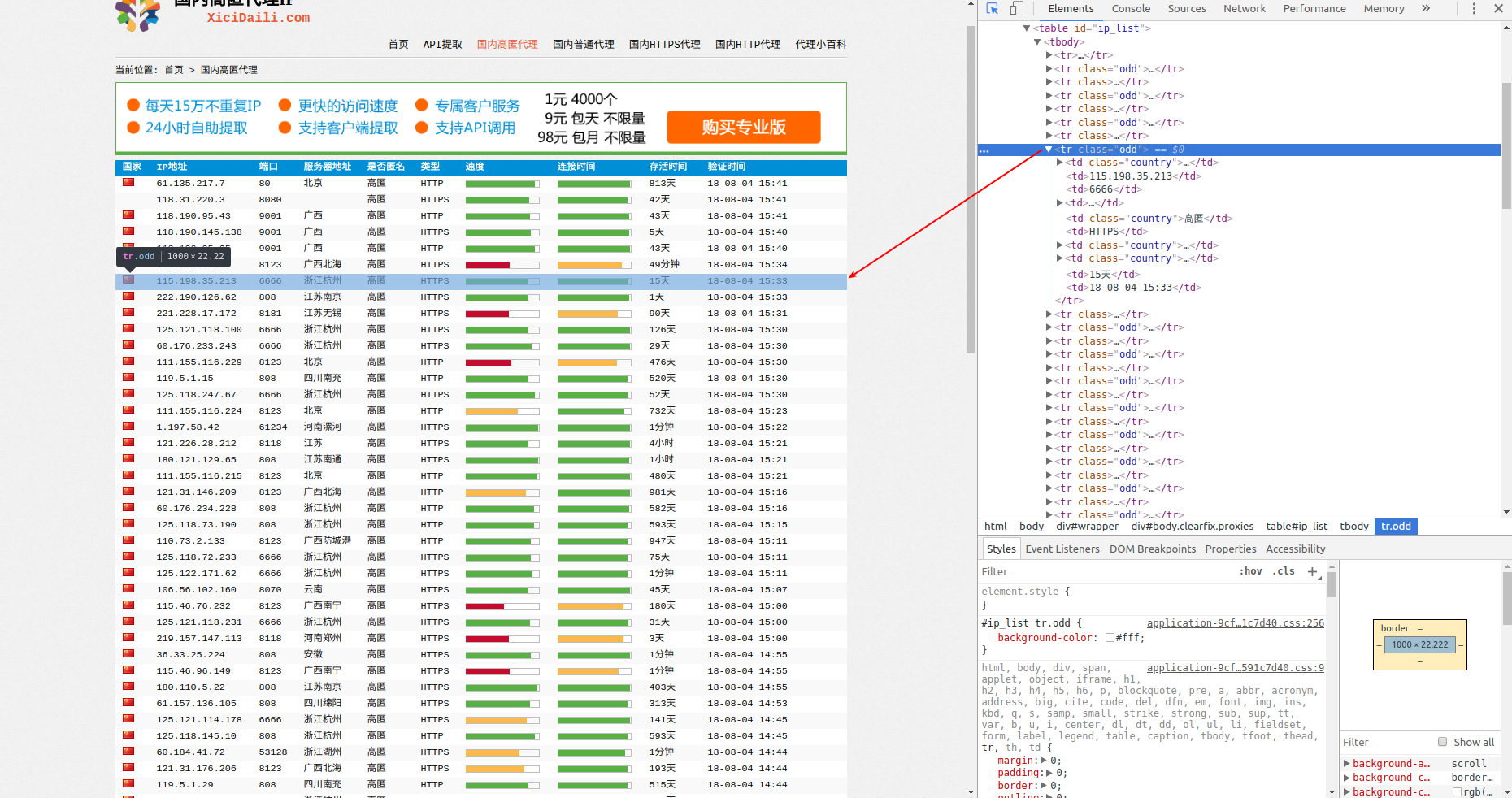
再来单独对一个tr标签进行分析:

115.198.35.213
6666
[浙江杭州](/2018-07-20/zhejiang)
高匿
HTTPS
15天
18-08-04 15:33
会发现:IP地址包裹在td[2]标签下,端口port包裹在td[3]标签下,类型(http/https)包裹在td[6]标签下。
程序编写
分析完页面后,接下来编写爬虫。本项目主要是对xici.py进行编写,对settings.py仅做了轻微改动。
实现spider
即编写xici.py文件,程序如下:
import scrapy
import json
'''
scrapy crawl xici -o out.json -a num_pages=50 -a typ=nn
其中`out.json`是输出有效代理的json文件,`num_pages`是爬取页数,`typ`表示代理类型,`nn`是高匿代理,`nt`是普通代理。

'''
class XiCiSpider(scrapy.Spider):
    # 每一个爬虫的唯一标识
    name = 'xici'
    # 使用-a选项,可以将命令行参数传递给spider的__init__方法
    def __init__(self, num_pages=5, typ='nn', *args, **kwargs):
        num_pages = int(num_pages)
        self.num_pages = num_pages
        self.typ = typ

    # 定义起始爬取点
    def start_requests(self):
        for page in range(1, self.num_pages + 1):
            url = 'http://www.xicidaili.com/{}/{}'.format(self.typ, page)
            yield scrapy.Request(url=url)

    # 解析response返回的网页
    def parse(self, response):
        proxy_list = response.xpath('//table[@id = "ip_list"]/tr[position()>1]')
        for tr in proxy_list:
            # 提取代理的 ip, port, scheme(http or https)
            ip = tr.xpath('td[2]/text()').extract_first()
            port = tr.xpath('td[3]/text()').extract_first()
            scheme = tr.xpath('td[6]/text()').extract_first()

            # 使用爬取到的代理再次发送请求到http(s)://httpbin.org/ip, 验证代理是否可用
            url = '%s://httpbin.org/ip' % scheme
            proxy = '%s://%s:%s' % (scheme, ip, port)

            meta = {
                'proxy': proxy,
                'dont_retry': True,
                'download_timeout': 5,
                # 下面的ip字段是传递给check_available方法的信息,方便检测是否可隐藏ip
                '_proxy_ip':ip,
            }
            yield scrapy.Request(url, callback=self.check_available, meta=meta, dont_filter=True)

    def check_available(self, response):
        proxy_ip = response.meta['_proxy_ip']
        # 判断代理是否具有隐藏IP功能
        if proxy_ip == json.loads(response.text)['origin']:
            yield{
                'proxy': response.meta['proxy']
            }
修改配置文件
- 更改USER_AGENT:西刺代理网站会通过识别请求中的user-agent来判断这次请求是真实用户所为还是机器所为。
- 不遵守robots协议:网站会通过robots协议告诉搜索引擎那些页面可以抓取,哪些不可以抓取,而robots协议大多不允许抓取有价值的信息,所以咱们不遵守。
- 禁用cookies:如果用不到cookies,就不要让服务器知道你的cookies。
文件settings.py中的改动如下:
USER_AGENT = "Mozilla/5.0 (X11; Linux x86_64) AppleWebKit/537.36 (KHTML, like Gecko) Chrome/66.0.3359.139 Safari/537.36"
ROBOTSTXT_OBEY = True
COOKIES_ENABLED = False
在编写好xici.py和settings.py后,我们的项目就大功告成啦!
使用方法
使用方法就是在命令行中执行以下命令即可:
$ scrapy crawl xici -o out.json -a num_pages=10 -a typ=nn
其中out.json是最终输出有效代理的json文件,num_pages是爬取页数,typ表示要爬取的代理类型,nn是高匿代理,nt是普通代理。
提示 :程序在验证代理有效性的过程中,对于无效的代理会抛出超时异常,不要管这些异常,让程序继续执行直到结束。